


App Cloner Premium & Add-ons
App Listo
I found App Cloner Premium & Add-ons most useful as a practical experimenter’s tool rather than as an everyday app for everyone. Its central idea is simple: make separate copies of Android apps so each copy can be handled as its own installation. That can be genuinely convenient when one phone needs to keep different accounts or separate app environments, but the experience depends heavily on the app being cloned and on how much time you are willing to spend testing the result.
App Listo’s app sits in the Libraries & Demo category, although its real appeal is much more hands-on than that label suggests. I see it as a utility for people who want more control over app organization than Android normally provides. It is free to install, rated for Everyone, and has passed the five-million-install mark, so it is clearly not an obscure experiment. At the same time, its average rating of 1.9 from roughly twenty-seven thousand ratings tells me to approach it with realistic expectations rather than assuming every clone will behave perfectly.
What using App Cloner is really like
The basic workflow is straightforward, but the result is app-dependent
The first thing I noticed is that the concept is easier to understand than the possible outcomes. You choose an existing application, create a copy, and install that copy alongside the original. The two installations can then be treated separately for tasks such as signing in with different accounts. The important detail is that cloning is not the same as magically rebuilding an app from scratch. The copied version still depends on the behavior of the original software, Android compatibility, and any services the developer expects to be present.
That distinction matters in daily use. A simple app with local content may be a good candidate, while an app tied closely to device verification, Google services, licensing, push notifications, or security checks may be much less cooperative. I would therefore test one copy before planning an important workflow around it. A clone that installs successfully can still have missing notifications, broken sign-in, unusual battery behavior, or features that refuse to work.
My most useful approach was to treat each clone as a separate workspace from the beginning. I gave it a clear purpose, used an unmistakable icon or label when available, and avoided assuming that data would move cleanly between the original and the copy. That small amount of organization prevents the common mistake of opening the wrong account or saving information in the wrong environment.
Related News

Instagram Is No Longer a Photo App. It Is an Attention Engine

Microsoft Teams Mobile: When Collaboration Becomes Navigation

How the NFL App Adapts to Android and iOS Updates

Temu: Elevate Your Shopping Experience to Billionaire Status

Why Traffic Rider Works Best as a Precision Reflex Game

How Google’s Find Hub Transforms Everyday Searches
A realistic everyday scenario
Imagine that I use one messaging or social application for personal conversations and another account for a small side business. Normally, I might need to sign out repeatedly, use a browser for one account, or carry a second phone. A separate installation can make account switching less disruptive because each copy opens into its own session. I can keep the personal version in my usual app folder and place the work version somewhere more visible during business hours.
That convenience is strongest when both accounts need to remain available. It is less impressive if I only switch accounts once a month, because the extra copy then adds clutter and another installation to maintain. It also does not remove the responsibility of managing notifications. Two active copies can mean duplicate alerts, and a busy phone can quickly become confusing if both icons look almost identical.
I would use this workflow for clearly separated identities, not for trying to bypass an app’s rules. Cloning does not make an account legitimate, remove a service’s restrictions, or guarantee that multiple accounts are permitted. The practical benefit is organization and access, not a free pass around another developer’s terms.
Gallery
Where the app shows its strongest value
The strongest argument for App Cloner is flexibility. Instead of accepting the single-installation model built into many Android devices, I can create a second environment when the normal app does not offer convenient account separation. That is a meaningful advantage for testers, freelancers, families sharing one device, and people who deliberately separate personal and professional activity.
It can also help during cautious testing. I may want to try a different login, configuration, or account without immediately disturbing the setup I already use. A clone gives me a place to explore, although I still would not treat it as a guaranteed sandbox. The copied app may share more behavior with the original than a true isolated testing environment would, and sensitive information should be handled carefully.
Another useful insight is that visual separation is almost as important as technical separation. If the original and clone have matching icons, I can mistake one for the other even when the accounts are different. I recommend renaming or labeling copies wherever the available options allow it, then placing them in separate folders. This sounds minor, but it is the difference between a helpful setup and a source of accidental messages or purchases.
Premium and add-ons change the decision
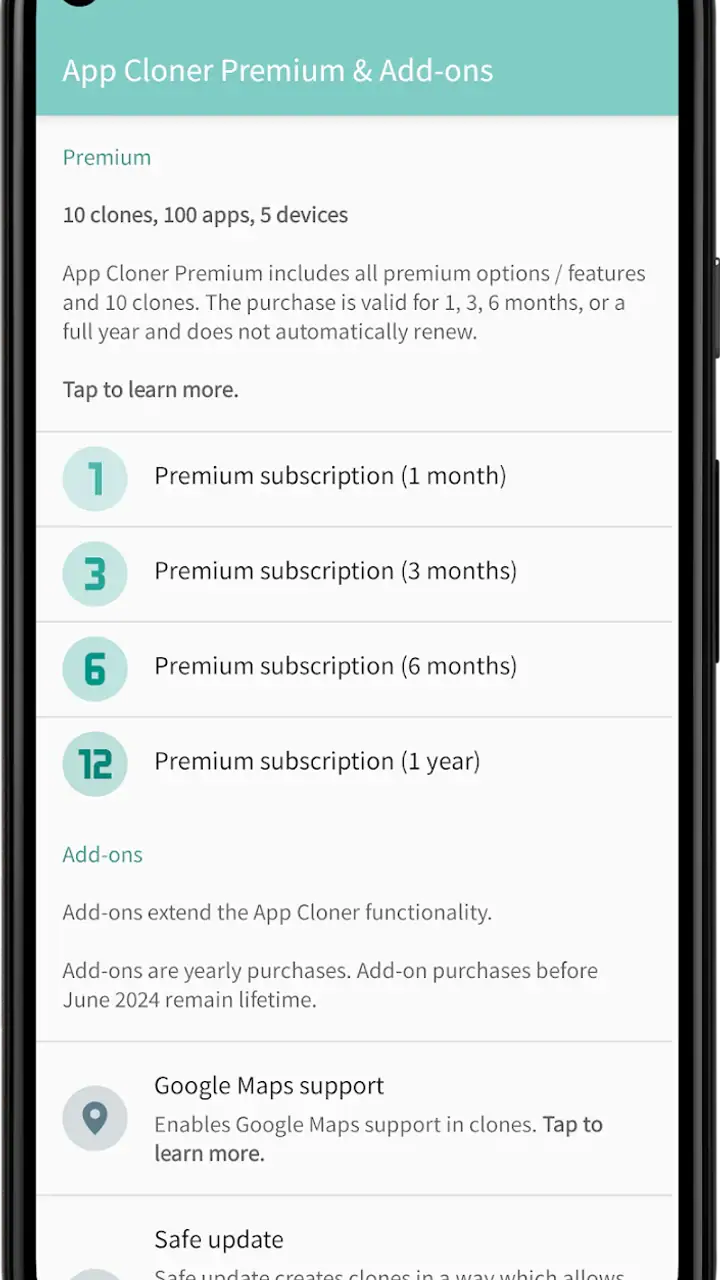
The free entry point makes it reasonable to see whether the core idea works on a particular phone and with a particular app. However, the product also includes Premium and add-ons, with in-app items ranging from around ten dollars to roughly three hundred and twenty dollars each. That is a wide range, so I would not pay for extras before confirming that the specific clone I need installs and performs properly.
For me, the correct order is simple: identify one real use case, make a test copy, check login and notifications, and only then consider an upgrade. Buying first would be a poor trade if the target application depends on services that do not survive cloning. The paid route makes more sense for someone who has several repeatable cloning tasks and already understands the limitations of the free experience.
I also think the name can create confusion. “Premium & Add-ons” sounds like a single package, but the practical question is not whether more options exist; it is whether a particular option solves a problem I actually have. I would evaluate each purchase against a specific workflow rather than collecting features simply because they are available.
The important weaknesses are compatibility and maintenance
The main weakness is that success is not universal. App Cloner can create a separate installation, but it cannot force every third-party app to accept that altered environment. Applications with strict security, device checks, account protection, or tightly integrated online services may behave unpredictably. For that reason, I would not make it the foundation of banking access, emergency communication, work authentication, or any account where a failed login could cause serious trouble.
Maintenance is another hidden cost. The original application and its clone may not update in exactly the same way, and I have to remember which copy contains which data. A cloned app can also become unnecessary after the original adds built-in multi-account support. Before keeping several copies permanently, I would review them occasionally and remove the ones that no longer serve a clear purpose.
Storage and attention matter too. Even when the copies are useful, they add another icon, another notification source, and potentially another set of cached files. On a phone with limited space, this is not a trivial concern. I would keep only the copies I use regularly and avoid cloning large apps merely to see whether it is possible.
There is also a trust question whenever an app is used to reproduce other apps. I would read each screen carefully, avoid granting access that is unrelated to my goal, and never assume that a clone has the same privacy characteristics as the original. The safest habit is to start with a low-risk application and learn how the process behaves before involving personal or sensitive accounts.
How it compares with ordinary alternatives
Before installing a cloning utility, I would check whether the phone already includes a built-in dual-app, app-copy, or work-profile function. A manufacturer feature may be simpler, more integrated, and less likely to create compatibility surprises. If the phone’s own tools support the exact application and account arrangement I need, I would usually choose them first.
Android’s work-profile approach can also be better for a clear separation between personal and professional data. It is designed around managed boundaries rather than merely producing another application icon. That makes it a stronger choice for people who need structured workplace separation, while App Cloner is more appealing when I want a quick, app-specific experiment.
Using a browser account is another alternative. It avoids installing a second copy and can be perfectly adequate for occasional access, but it is less convenient for services that rely on native notifications or mobile features. A second device provides the cleanest separation, though it costs more and is inconvenient to carry. App Cloner occupies the middle ground: cheaper and more flexible than another phone, but less predictable than a built-in feature or a fully separate device.
Who should use it, and who should skip it
I would recommend it to technically comfortable Android users who have a precise reason for needing multiple app environments. It is especially suitable for people managing two accounts, testing a configuration without disturbing a main installation, or separating a side project from personal use. These users are usually willing to check whether a clone works, organize icons carefully, and troubleshoot when an online service does not behave normally.
I would be more cautious about recommending it to someone who wants a one-tap solution with no maintenance. If the goal is simply to switch between two accounts occasionally, the app’s extra complexity may outweigh the benefit. A phone’s built-in duplication feature, a work profile, or the service’s own account switcher may be easier and more reliable.
I would also skip it for critical applications unless I had thoroughly tested the exact setup. A clone should not be assumed to preserve every security check, notification pathway, payment function, or account recovery option. For sensitive work, predictability matters more than flexibility.
Compatibility, version, and installation expectations
The current version is 3.4.0 and it supports Android 5.0 and later, which gives it a broad potential device range. That does not mean every older phone will deliver the same experience. Android versions, manufacturer changes, memory limits, and the target app itself can all affect the outcome. I would keep the phone’s system and the source application reasonably current before troubleshooting a failed clone, while remembering that updates can also change compatibility.
The age rating is Everyone, which makes the app broadly accessible from a content perspective. That rating should not be confused with a promise that every cloned application is suitable for every user or situation. The copied app brings its own content, account rules, and data responsibilities with it.
Because the app is free to install, I see little reason to commit immediately to a paid option. I would begin with a harmless test application, confirm that the copy launches, and then verify the exact functions I need: sign-in, notifications, media handling, and any account switching. If one of those fails, I would try a different alternative rather than assuming a Premium purchase will solve a fundamental compatibility problem.
My final assessment
After weighing the convenience against the friction, I see App Cloner as a specialized utility with a clear practical purpose, not a universal fix for Android’s account limitations. Its best quality is the freedom to create separate app installations where the standard experience may offer only one. That can save time and reduce repeated logins in the right circumstances.
Its weakest point is the gap between creating a copy and guaranteeing a fully working duplicate. The more dependent an app is on security, online services, device identity, or background notifications, the more carefully I would test it. The low average rating also reinforces my cautious view: the concept is attractive, but individual results can vary enough that nobody should install it blindly for an essential task.
My recommendation is to try App Cloner when you have a specific, low-risk need for separate accounts or app environments. Start with one copy, label it clearly, test every important function, and keep the setup only if it genuinely improves your routine. If your phone already offers a reliable dual-app or work-profile feature, I would choose that first. If you enjoy fine-tuning Android and accept some trial and error, App Cloner Premium & Add-ons can be useful; if you want effortless reliability, it is probably not the right tool.
FAQs for App Cloner Premium & Add-ons
What is App Cloner Premium & Add-ons?
App Cloner Premium & Add-ons is an advanced app designed to help users clone their favorite applications on their Android devices. This allows users to run multiple instances of the same app simultaneously, each with its own settings and data, enhancing usability and flexibility.
How does App Cloner Premium differ from the free version?
The premium version of App Cloner offers additional features not available in the free version, such as the ability to clone premium apps, customize app icons, and access advanced privacy settings. These enhancements provide greater control and personalization options for users seeking to maximize the app's potential.
Is it safe to use App Cloner Premium on my device?
Yes, App Cloner Premium is safe to use, provided it is downloaded from a reputable source. The app uses secure methods to clone applications without affecting the original app's data. However, it’s essential to ensure that any cloned apps comply with the terms of service of the original applications.
Can App Cloner Premium clone all types of apps?
While App Cloner Premium can clone a wide variety of apps, some applications, particularly those with strict security measures like banking apps, may not be clonable due to built-in restrictions. It’s advisable to check compatibility with specific apps before attempting to clone them to avoid any issues.
What are the system requirements for using App Cloner Premium?
App Cloner Premium requires an Android device running version 4.1 or higher. Users should ensure they have sufficient storage space available for the cloned apps. Additionally, having a device with good processing power will enhance the performance and speed of the cloned applications.
Pros
- Allows multiple app instances.
- Customizable app icons and names.
- Privacy options for cloned apps.
- No ads in premium version.
- Supports various add-ons.
Cons
- Premium version requires purchase.
- Some apps may not clone well.
- Not all features available on iOS.
- Cloning can consume extra storage.
- Occasional app crashes reported.


